
Controller setup · Updated
How to use the Steam Controller as a MIDI controller
Short answer
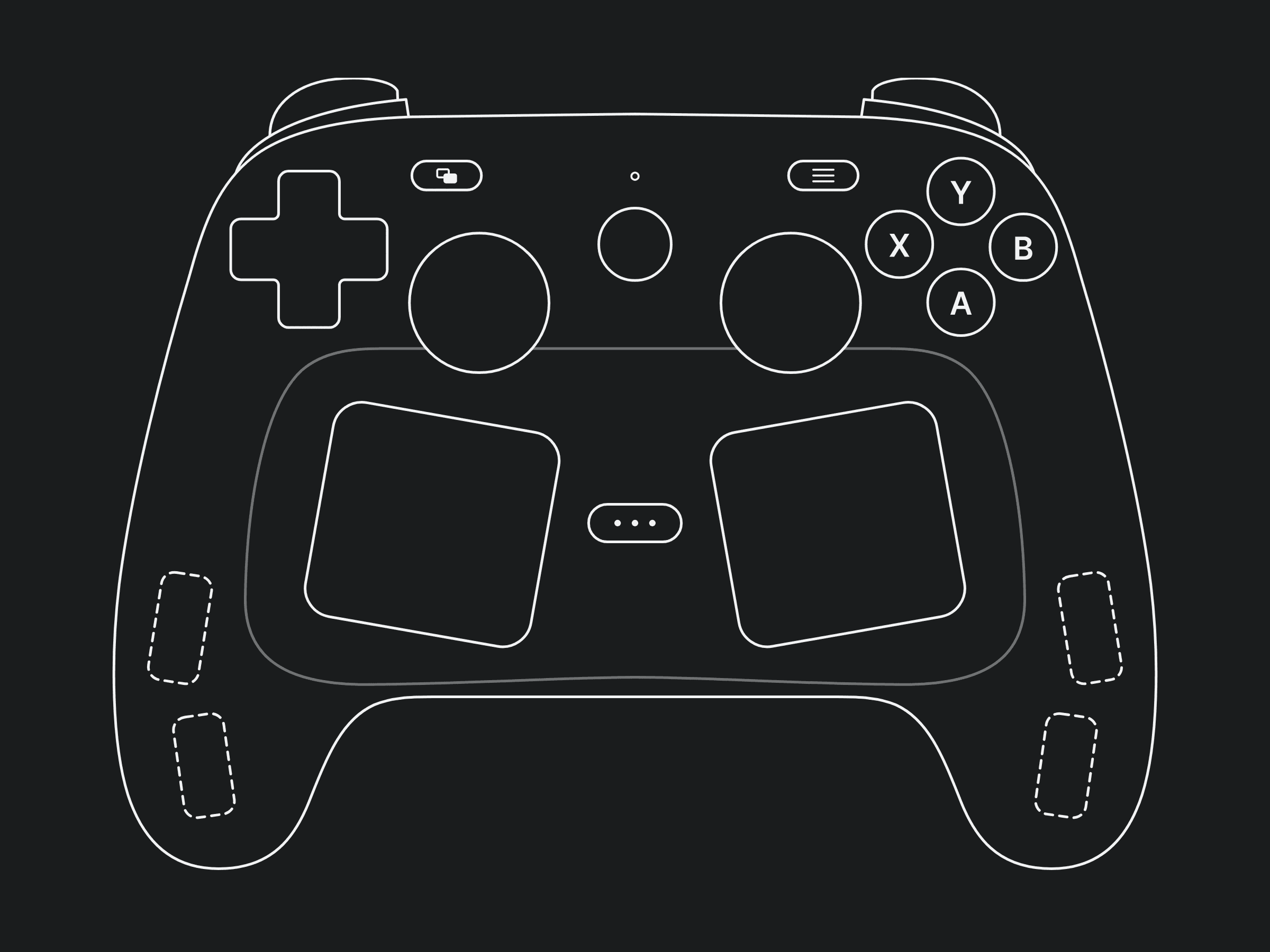
Yes, with PadMap 1.8 or later. Connect the 2026 Steam Controller and open PadMap, which recognises it and draws its two trackpads, back paddles and Quick Access button. Map each trackpad's X and Y to CC for two XY pads, set a pressure curve, then enable the PadMap MIDI input in your DAW.
Set up the Steam Controller in PadMap
- 1
Update PadMap to 1.8
The Steam Controller profile arrived in PadMap 1.8. If you already run PadMap, the update notifier in its header installs it in place; otherwise download the latest version. PadMap runs on Windows, macOS and Linux. - 2
Connect the controller
Plug it in by cable, or connect it wirelessly the way Valve describes for your system. PadMap recognises the 2026 controller by its own hardware IDs and switches its drawing to the Steam Controller, with both trackpads and the dashed back paddles. If PadMap still shows an Xbox or generic pad, see the notes on Steam Input below. - 3
Map the trackpads
Click a trackpad in PadMap's drawing. Each one is its own control, with four parts: touch, click, X and Y. Put X and Y on two CCs and the pad works as an XY pad: slide your thumb to sweep a filter's cutoff and resonance together. Touch and click are on/off, so they suit notes or switches, and the left pad and the right pad are mapped independently. - 4
Set the pressure curve
The trackpads also report how hard you press. In the control editor, the PRESSURE CURVE graph sets how pressure turns into the value sent: drag it up so a light touch counts for more, or down to need a firmer press. A dot follows your thumb while you press, so you can tune the curve by feel. Double-click resets it to linear. - 5
Enable PadMap in your DAW
On macOS and Linux, PadMap creates its own MIDI port, PadMap Out. On Windows it sends through a free loopMIDI port: create one called PadMap. Then switch on that MIDI input in your DAW and use its MIDI learn. Step-by-step guides: Ableton Live, FL Studio, Logic Pro, Bitwig Studio and REAPER.
Steam Controller controls and what to map them to
The trackpads are what set this controller apart. Everything else lines up with an Xbox layout, plus four paddles behind the grips.
| Steam Controller control | Good MIDI job |
|---|---|
| Left and right trackpads (X / Y) | Two XY pads. Unlike a stick, a trackpad doesn't spring back: X and Y stop sending when you lift your thumb, so the parameter stays where you left it. That suits settings you set and leave, such as cutoff and resonance, or a delay's time and feedback. |
| Trackpad pressure | A third axis on each pad. Press into the pad to add drive or open a send while X and Y keep doing their job. Shape it with the pressure curve. |
| Trackpad touch and click | Touch is on while your thumb rests on the pad, click when you press it in. Use touch to switch an effect on only while you play the pad. |
| Thumbsticks | Two CCs each. They spring back to centre, so use them for moves that should return: a pitch wobble, a pan sweep. |
| L2 / R2 triggers | Analog CC from zero to full: a volume swell or a reverb throw that falls away when you let go. |
| A, B, X, Y and the D-pad | Notes. Eight drum hits, or chord tones, under your thumbs. |
| Back paddles (L4, L5, R4, R5) | Buttons your fingers press without leaving the grips, which makes them ideal modifiers for a second mapping layer, or for record and loop switches. |
| Quick Access (the ··· button) | An occasional action through MIDI learn: start and stop, or arming a track. |
| Gyro (tilt the controller) | CC from movement. Tilt for a filter or a pan while both thumbs stay on the trackpads. |
Trackpad haptics
By default PadMap gives you a light haptic tick as your finger lands on a trackpad and moves across it, so you can feel the pad responding without looking at the screen. If you would rather play in silence, switch Trackpad haptics off in PadMap's Settings.
Steam Input, the 2015 controller and the Steam Deck
- Steam Input. While Steam runs, it can take the controller over and pass it on as a different one. If PadMap doesn't react, or draws a generic pad, quit Steam, reconnect the controller and try again.
- The 2015 Steam Controller shares Valve's hardware ID prefix but isn't covered by the new profile. This guide is about the 2026 controller.
- The Steam Deck runs Linux, and PadMap has a Linux build, but the Deck's built-in controls aren't part of this profile either.
- Tested on Windows. The same profile ships in the macOS and Linux builds.
More controls than buttons: layers
PadMap lets you stack mapping layers and set any control as a modifier: while you hold it, everything else sends a different set of notes and CCs. On the Steam Controller the back paddles are made for this, because you hold them with a finger you weren't using anyway.
One way to split it: on the base layer the trackpads run two XY pads on your lead synth. Hold L4 and the same pads move a delay and a reverb instead. Hold R4 and the face buttons stop playing drums and launch clips. Each layer sends its own messages, so your DAW's MIDI learn treats them as separate controls.
Written by Oskar Schachtschneider, who builds PadMap at Sinuslabs.